

Preprocessor directives in AL: a practical, no BS guide
Yo BC Artisans,
For the past few weeks there’s been a lot happening in the BC space. I remember Microsoft holding back the BC27 platform upgrade for a while, and I believe one of the reasons was breaking changes.
Here’s the thing: Platform 26.5 is the last stable update before 27.0.
26.5 had a bunch of changes, but nothing broke. e.g. Invoice Post. Buffer posting routine, No. Series, and other events.
Instead of being removed or marked obsolete, they just stopped firing, which breaks stuff if you’re subscribed to them.
Normally, Microsoft would notify you that your environment can’t be upgraded because of some extension you need to fix. But that didn’t happen in 26.x. So if you added a custom field in G/L entry and subscribed to an event that fills that field, and that event no longer fires then yeah, we’ve got a problem.
Good news though: those issues are now officially treated as breaking changes in BC platform upgrade 27.
Why am I telling you this?
Because I want to share how you can handle these changes, breaking or not, in a smarter way. Microsoft does it too (try to notice their pattern), but we often ignore it. I used to, honestly.
If you’ve been writing AL for BC long enough, you’ll eventually need to ship the same app to slightly different worlds: production vs sandbox, feature on vs off, or old runtime vs new runtime.
So how do you deal with that?
Meet Preprocessor directives. They’re underrated, not really popular among AL devs, probably because most haven’t seen them in action.
TL;DR for beginners
- Preprocessor directives are simple on/off switches at compile time.
- You turn them on with names (called symbols) in
app.json. - Use them for three things:
#if: include or exclude code.#region: fold code for readability.#pragma: temporarily hide a warning you already know about.
- You choose the symbol names. Microsoft often uses
CLEANXXe.g.CLEAN26,CLEAN27, andCLEANSCHEMA26to control cleanup across versions.
If you only remember one thing: put a symbol in app.json, then wrap code with #if SYMBOL_NAME and #endif
What Preprocessor Directives Are
If you’ve ever seen AL code with lines that start with #, you’ve met preprocessor directives. They’re not real code that runs in your app, think of it as giving special notes to the compiler so it can set things up before looking at your real program code.
In simple terms: A preprocessor directive is like telling the compiler:
“Hey, before you start building the program, do this first.”
Think of them like little switches or notes you leave for the compiler. They help you:
- Turn parts of your code on or off using
#if,#elif,#else,#endif - Organize large files with collapsible sections using
#regionand#endregion - Hide or control warnings with
#pragma warning disable <code>
Pretty handy, right? But there are a few things to know so you don’t run into surprises:
- AL doesn’t give you built-in symbols like C#’s
DEBUG.
You must create your own symbols. - Symbols are super simple: they’re either defined (true) or not defined (false).
No values, no data, nothing fancy. - You can define symbols globally in
app.jsonor locally in a file using#defineand#undef. - Regions and
#ifblocks can be inside each other, but they can’t overlap in weird ways. They need to stay properly nested. - And one important detail: user personalization and profiles do NOT use directives. These directives only work at compile time, not afterwards.
That’s really all there is to it. Preprocessor directives don’t change how users experience your app; they just help you control and clean up your code before it ever gets compiled.
Quick setup: define symbols (3 steps)
Think of a symbol as a simple flag you turn on. If it is listed in app.json, it is true everywhere. If not, it is false.
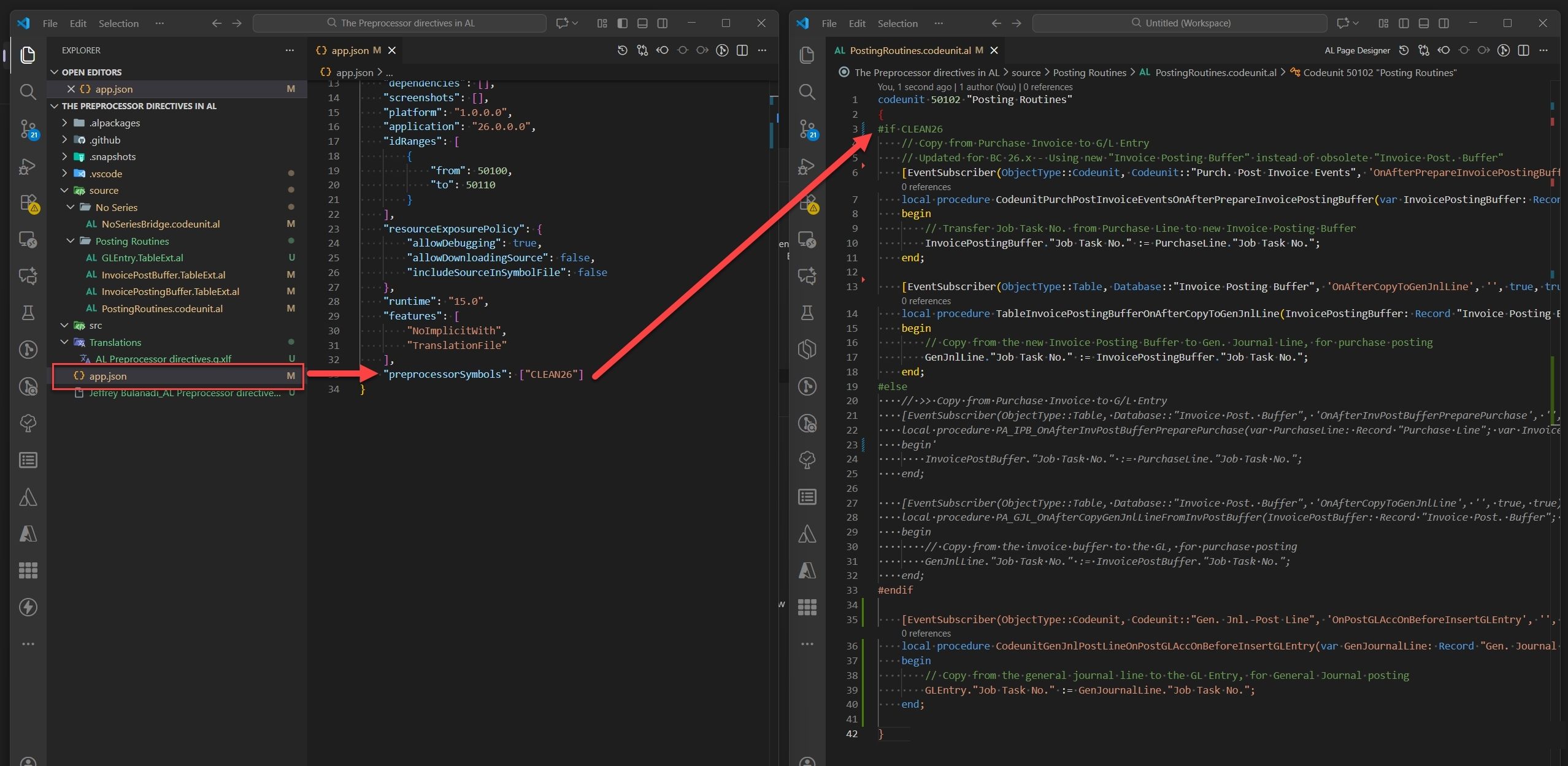
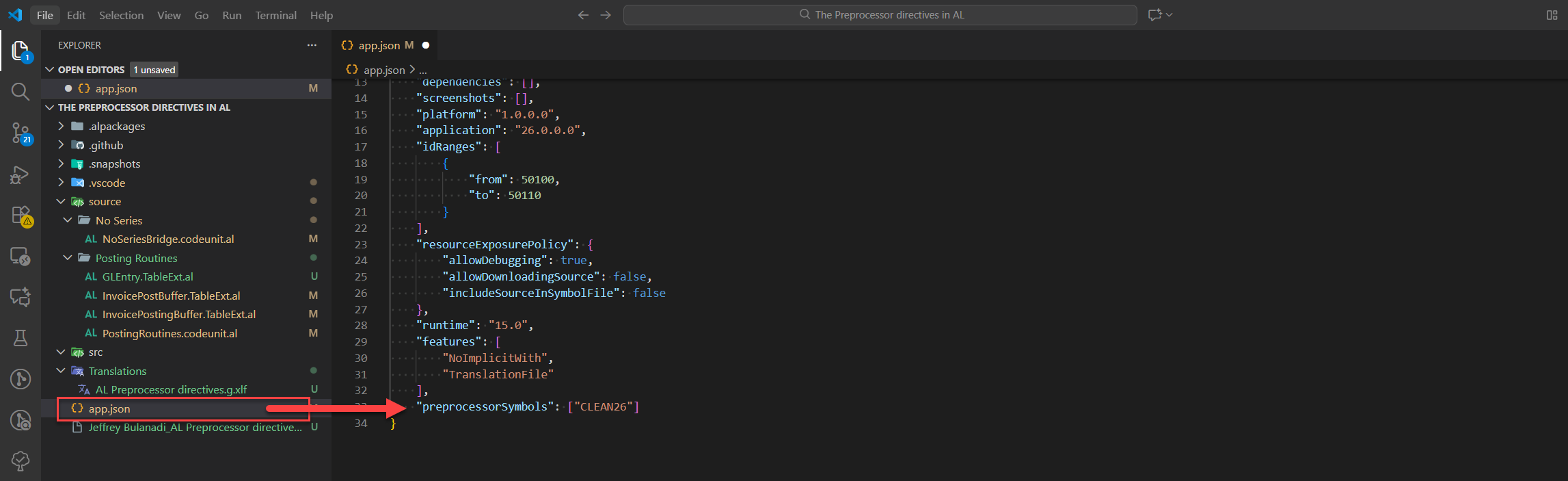
- Add the symbol name to
preprocessorSymbolsinapp.json. - Wrap code with
#if SYMBOLand#endif. - Build. If the symbol is present, the code compiles. If not, the code is skipped.
Core building blocks (fast version)
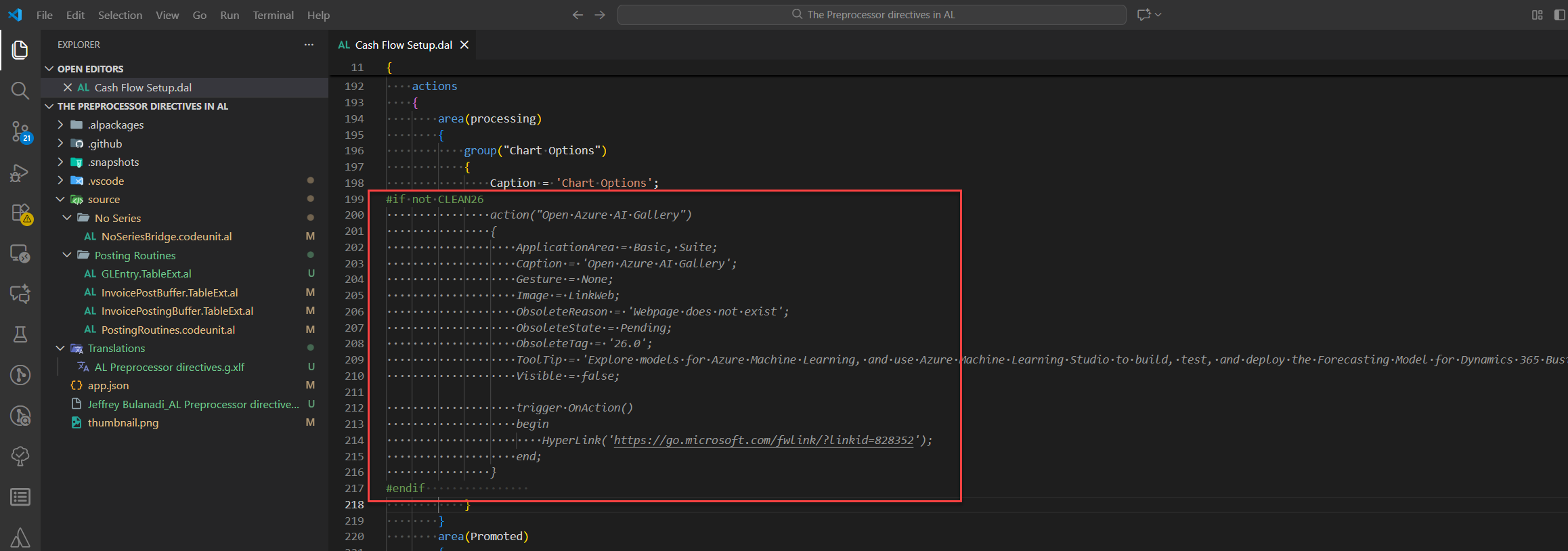
Conditional: skip (Reference from actual Microsoft code)
Remember:
and,or,notare allowed.- Undefined symbol = false.
Regions: fold code (Reference from MS)
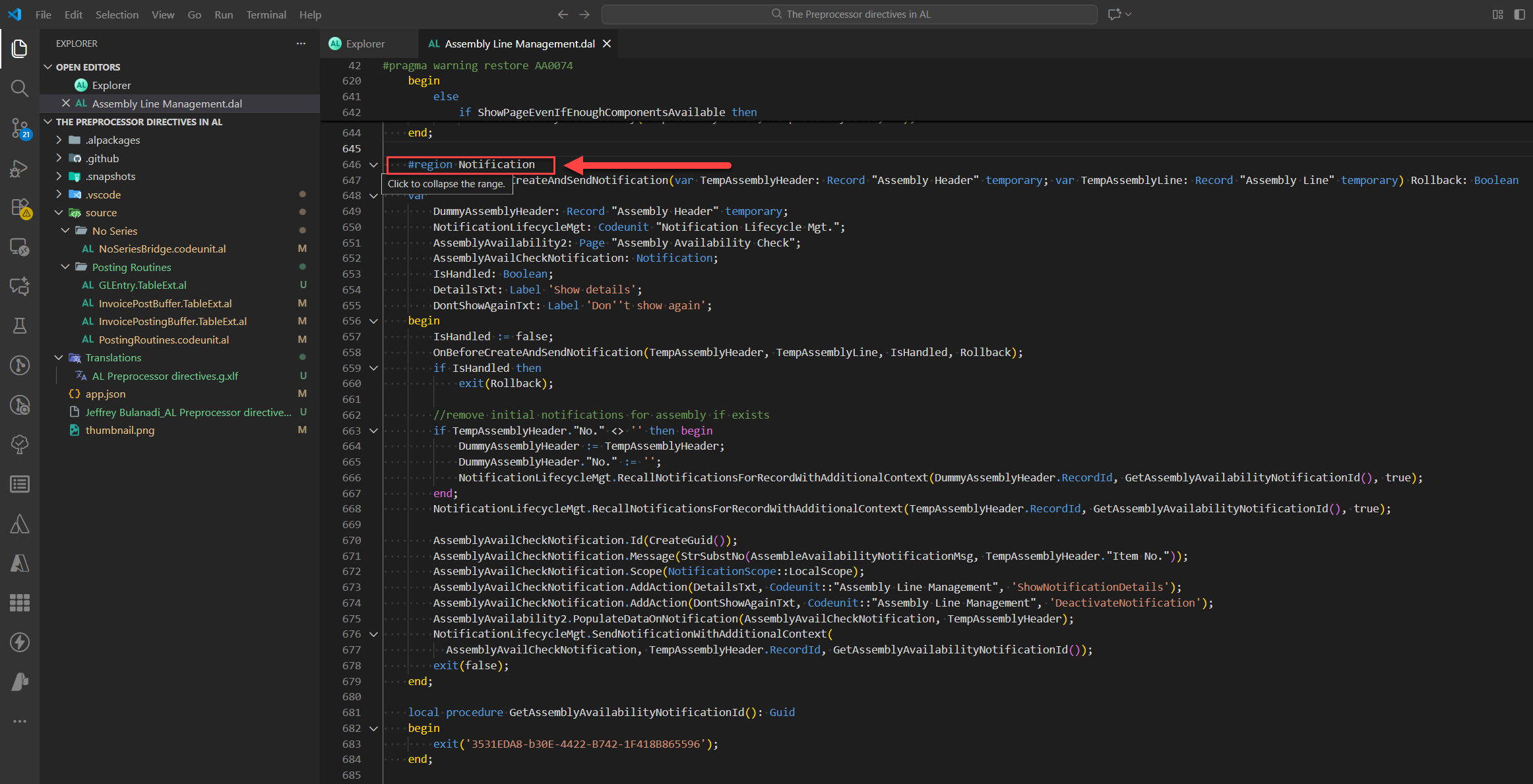
Only for navigation. Does not affect compilation.
Pragmas: silence a warning briefly (Another reference from MS)
Use when you know a warning, accept it for now, and will fix later.
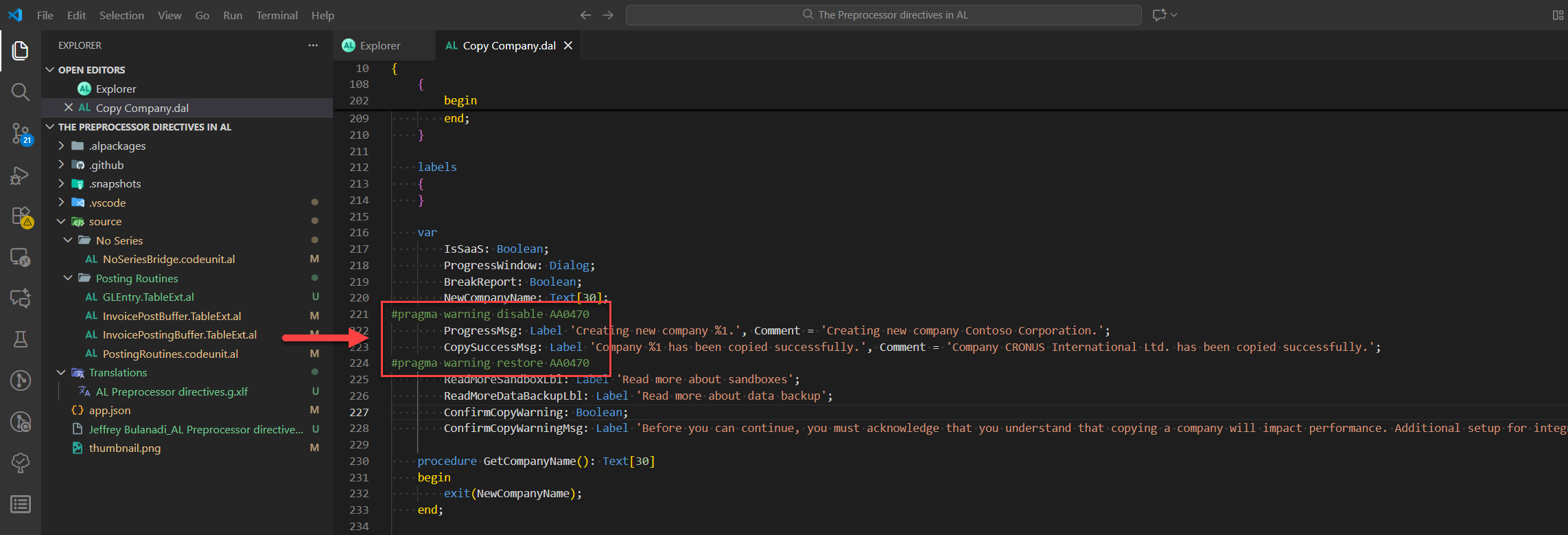
Rules:
- Make the disabled block tiny.
- Always restore.
- Target only one warning code.
Tiny pattern: disable → place the few lines → restore. Don’t wrap the whole file.
#pragma warning , a simple way to see it
Think of the compiler like a smoke alarm in your kitchen. When it detects smoke, it goes beep beep beep!, that’s a warning.
But sometimes you’re just making a fried rice, a toast or whatever you are cooking, and you know it’s fine. You don’t want the alarm screaming while you finish cooking.
So you press the silence button:
That’s #pragma warning disable → “Stop beeping for this warning right now.”
Later, you let the alarm go back to normal: That’s #pragma warning restore → “Okay, beep again if you detect smoke.”
Code example
#pragma warning disable AL0468 // Silence this warning
// Code where the warning is ignored
#pragma warning restore AL0468 // Let warnings work again
In short:
- Disable = mute the alarm for a specific warning.
- Restore = unmute it so you don’t miss real problems.
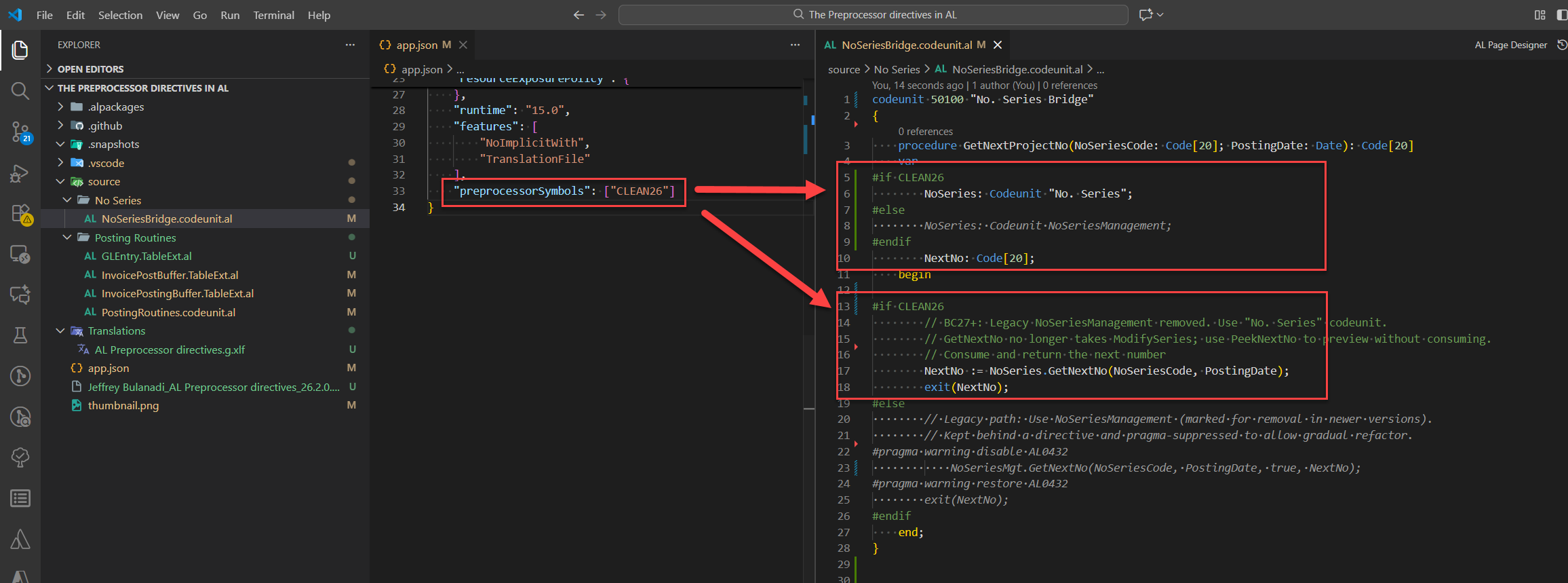
Demo: Handling NoSeriesManagement → "No. Series" breaking change
This is grab code from my actual repo (of course, I stripped out the sensitive stuff).
So here’s one of the big ones: Microsoft split and modernized number series starting in BC24 with the new Business Foundation module.
The old NoSeriesManagement codeunit is on its way out. If you’re on BC27, it’s gone.
The replacement codeunit is "No. Series" and "No. Series - Batch" if you’re pulling lots of numbers at once.
How to survive it (2 quick steps):
Say you’ve got a data entry codeunit that needs numbers. Before, you’d call NoSeriesManagement. Now it’s swapped out for No. Series.
-
Build a small wrapper codeunit (the “bridge”) with
#if CLEAN26inside.
That way, the bridge decides whether to call the oldNoSeriesManagementor the newNo. Seriesdepending on your target version. -
Flip the switch in
app.jsonwhen you’re ready for BC27.
Just add"CLEAN26"topreprocessorSymbolsso the compiler uses the new path everywhere.
Usage:
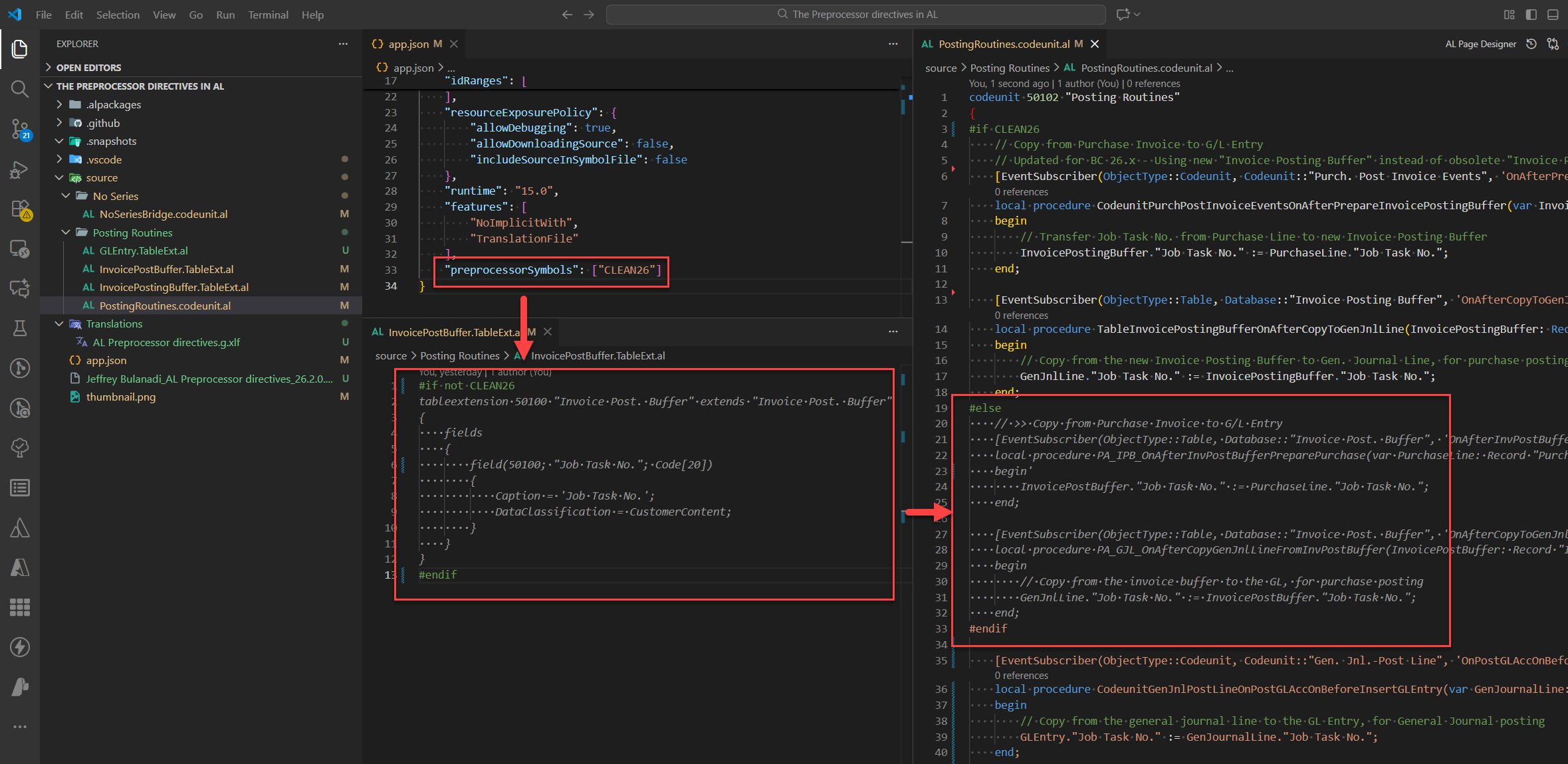
Demo: Invoice Posting Buffer change ("Invoice Post. Buffer" → "Invoice Posting Buffer")
Here’s another real sample from my repo.
We’re adding a custom field to G/L Entry and also to Invoice Post. Buffer.
Since Invoice Post. Buffer is being deprecated, we need to add the same field to the new table Invoice Posting Buffer as well.
This one changed around BC26.
The old table Invoice Post. Buffer got replaced by the new Invoice Posting Buffer.
Stuff that used to run as events on the table was moved into separate codeunits.
If you want your code to work on both versions, just put #if / #else around your calls.
Upgrade path in 2 steps:
- Add
CLEAN26inapp.jsonwhen targeting the new buffer. - Subscribe to the new events only when
CLEAN26is defined; otherwise keep the legacy path.
Versioned cleanup with CLEANxx and CLEANSCHEMAxx
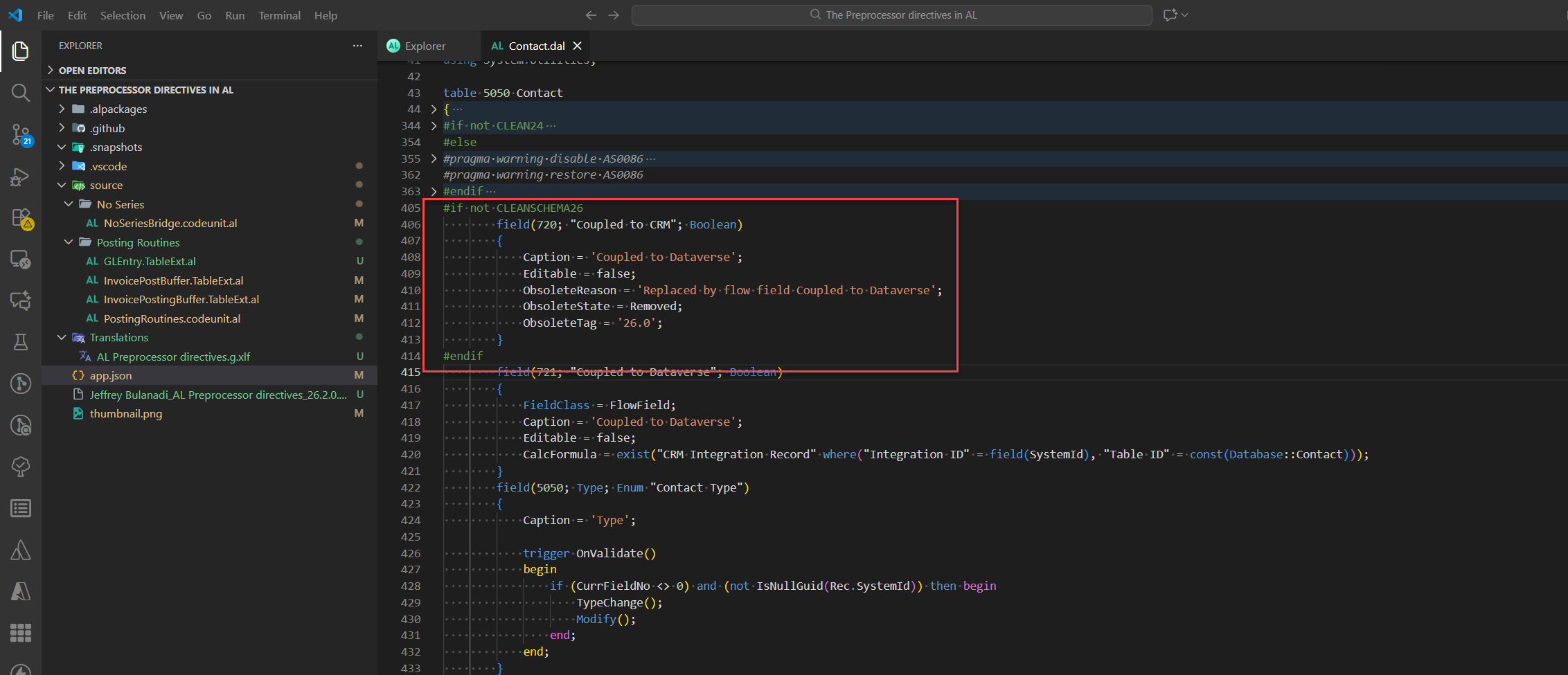
Microsoft’s Base App uses versioned symbols like CLEAN26, CLEAN27 and CLEANSCHEMA26 to control when obsolete code turns into removed code, and when schema can be dropped.
AL does not define these automatically. You choose when they are active by adding them to your app.json or CI build config.
i.e, keep a field until schema cleanup in 26
Gotchas (stuff I learned the hard way)
- AL doesn’t give you any built‑in symbols. If you need one, define it yourself.
- You can’t overlap regions with
#ifblocks. If you need both, just nest them. - If you
#pragma warning disableand don’t restore it, it stays off until the end of the file. Keep that scope tight. - Directives only work at compile time. They won’t change at runtime based on tenant or environment.
Pocket reference
- Conditional:
#if,#elif,#else,#endif,#define,#undef. - Operators:
and,or,not. - Regions:
#region…#endregion. - Pragmas:
#pragma warning disable|restore <ID>,#pragma implicitwith disable|restore. - Define symbols:
app.json→preprocessorSymbols; or per-file with#define/#undef.
FAQ (quick answers)
- Do symbols turn on automatically when I upgrade? No. You must add them to
app.jsonor set them in your build. - Can I give symbols values? No. A symbol is either defined (true) or not (false).
- Is
#regiononly for looks? Yes. It does not change the compiled code. - Is it safe to disable warnings? Only if you scope it to the smallest possible place and restore it after.
Final thoughts
- You can run your code in many versions, just use
#ifto handle the differences. - Copy Microsoft’s style for symbols, like
CLEAN26orCLEAN27. Simple names are fine. - Think of
#pragma warninglike a smoke alarm. You can mute it or unmute it, but only for a short time. Always know what you’re doing when you switch it off.
Support for the Community
I really appreciate any comments, good or bad. That’s how we learn from each other, right?
Drop a note and you’ll definitely keep me smiling. LOL, seriously, thank you.
If sharing this doesn’t take much of your time, I’d be grateful. It helps spread the knowledge and keep the love going for the Microsoft Dynamics 365 Community.
And if you want to see more stuff I post beyond Business Central, give me a follow: Jeffrey Bulanadi
Demo Repository
All the code and screenshots are up on my GitHub.
Check it out here: How to survive breaking changes using Preprocessor directives in AL
Join the Conversation
Share your thoughts, ask questions, or discuss this article with the community. All comments are moderated to ensure quality discussions.
No comments yet
Be the first to start the conversation!
0 Comments
Leave a Comment